Moving to Johor Bahru: The First Week Checklist (In the Order You Actually Need It)
Moving to a new country is exciting, and let’s face it — overwhelming, especially with kids in tow.
No matter how organized you are, something always falls by the wayside, and before you know it, you try to order dinner and realize you can't because the delivery app needs an OTP sent to a Malaysian number you don't yet have.
Cue the screaming, hangry kids.
When I moved to Iskandar Puteri in JB, I quickly learned that the overwhelm doesn’t come only from the number of things to sort out—it’s the order. Many key things can’t happen until something else is done first.
So here are the 10 things you need in your first week, in order.
Quick note: this reflects what I've personally experienced and what I've seen work for other families moving here in Summer 2026. Requirements change often, so vendor details for services like Wise and Touch n’ Go may change.
Do These First (Days 0-1)
1. Get a local phone number (download WhatsApp)
This is the first thing I'd do, and here's why: Banks, Grab, e-wallets, delivery apps, and Wi-Fi providers all send One-Time Passwords (OTPs) to a Malaysian number, and your overseas number won't cut it.
Prepaid SIMs require passport registration, so grab one at the airport, at a telco store or via eSIM. Then register the new number with WhatsApp straight away. Some apps, including Touch 'n Go, send verification codes by WhatsApp, and if the number isn't set up yet, the code simply never arrives. No need to present ID.
Don’t be like me and swear off all service providers because “they won’t send the OTP.” Check your Unknown Senders and Spam tab in iMessages on your iPhone to find them!
More on how to set this up below.
2. Download Grab (and Google Maps)
Until you sort out transport, Grab is your car, your lifeline and your sanity. Set it up while you still have airport Wi-Fi, and opt for the Standard option, as there isn’t really a Premium ride here, and 6-seaters will take twice as long to arrive. Grab Delivery can also be a lifesaver for groceries, and it's fast (think 40 mins to two-hour delivery times).
3. Carry some ringgit
Not a lot, just enough for a few days until all your electronic banking gets sorted.
Book These Immediately (Days 1-3)
4. Wi-Fi Installation (it can take an outrageous amount of time)
I’m still not over having my husband camp out at the local Starbucks for “strong wi-fi” while I unpacked the house, managed the kids, and tried to get essentials in our first few weeks. And yes, I said weeks.
The wi-fi installation lag is a real issue. Depending on your provider and your building/area, it can take anywhere from a few days to a couple of weeks.
Book it as soon as you have an address and a local number, and if you can, before you land. Check whether your condo or landlord limits your provider choices, and use an unlimited data plan or hotspot as a bridge.
5. Set up Touch 'n Go eWallet
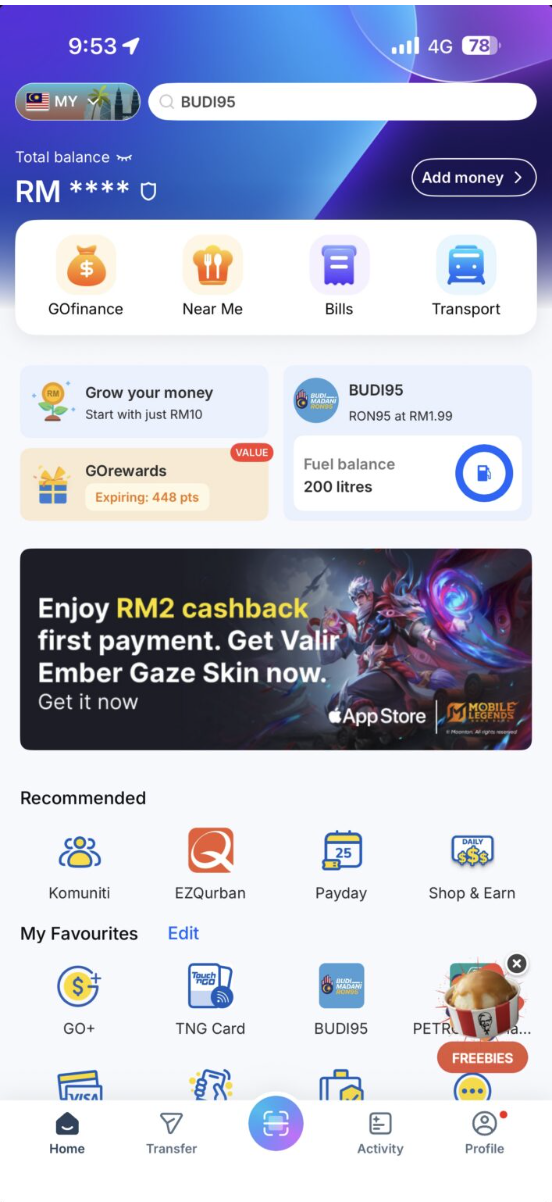
The Touch 'n Go app is the key to buying almost anything in Johor Bahru. Touch 'n Go (TNG) is Malaysia's most widely used cashless system. It covers tolls, parking, public transport, petrol, retail and the QR codes that are everywhere here.
There are two parts to it:
- The eWallet (the app): QR payments, online shopping, bill payments and transfers.
- The Touch 'n Go card: the tap-and-go card for tolls, parking and buses. You can buy a reloadable one through the app for about RM10 and link it to your eWallet using the serial number on the back.
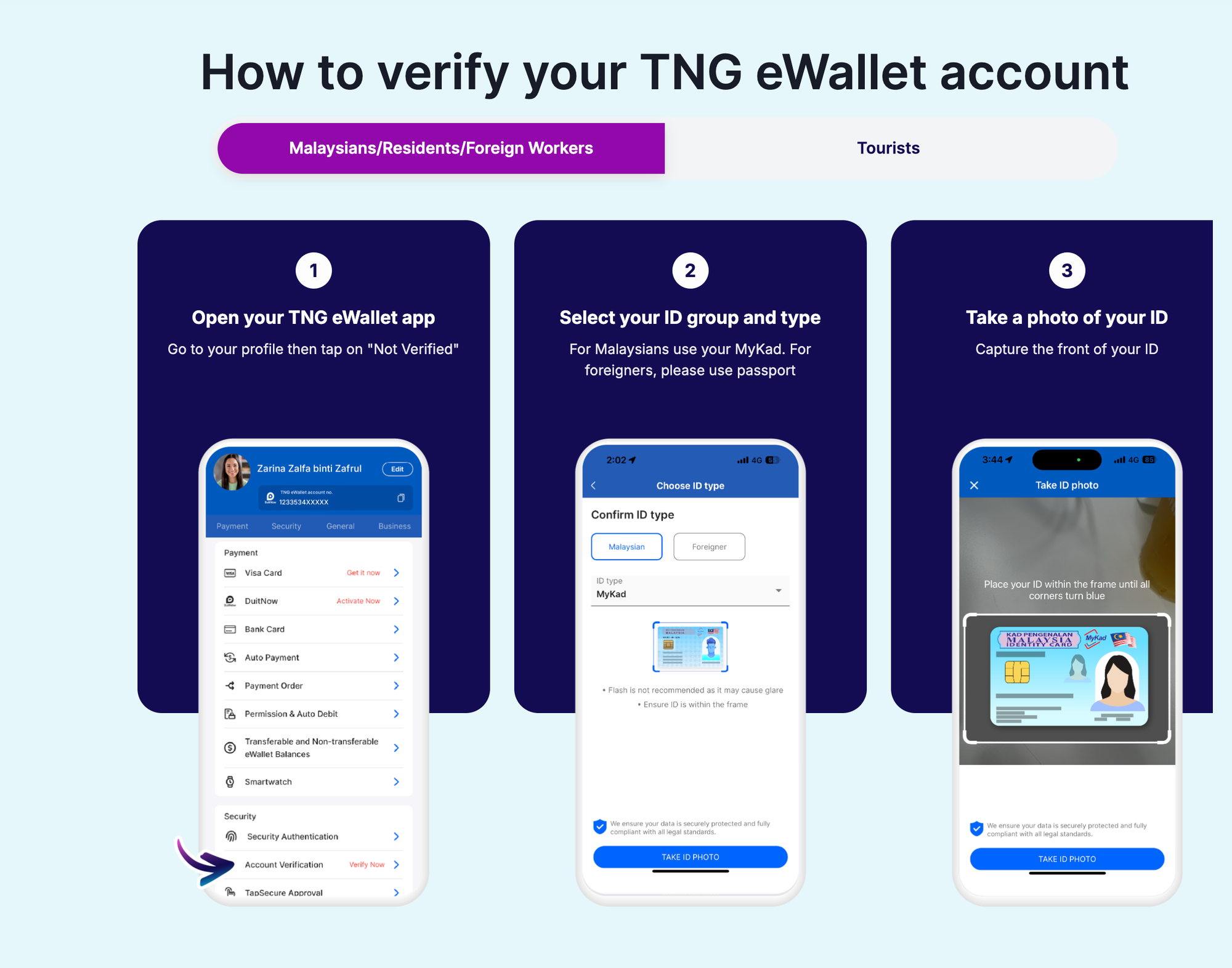
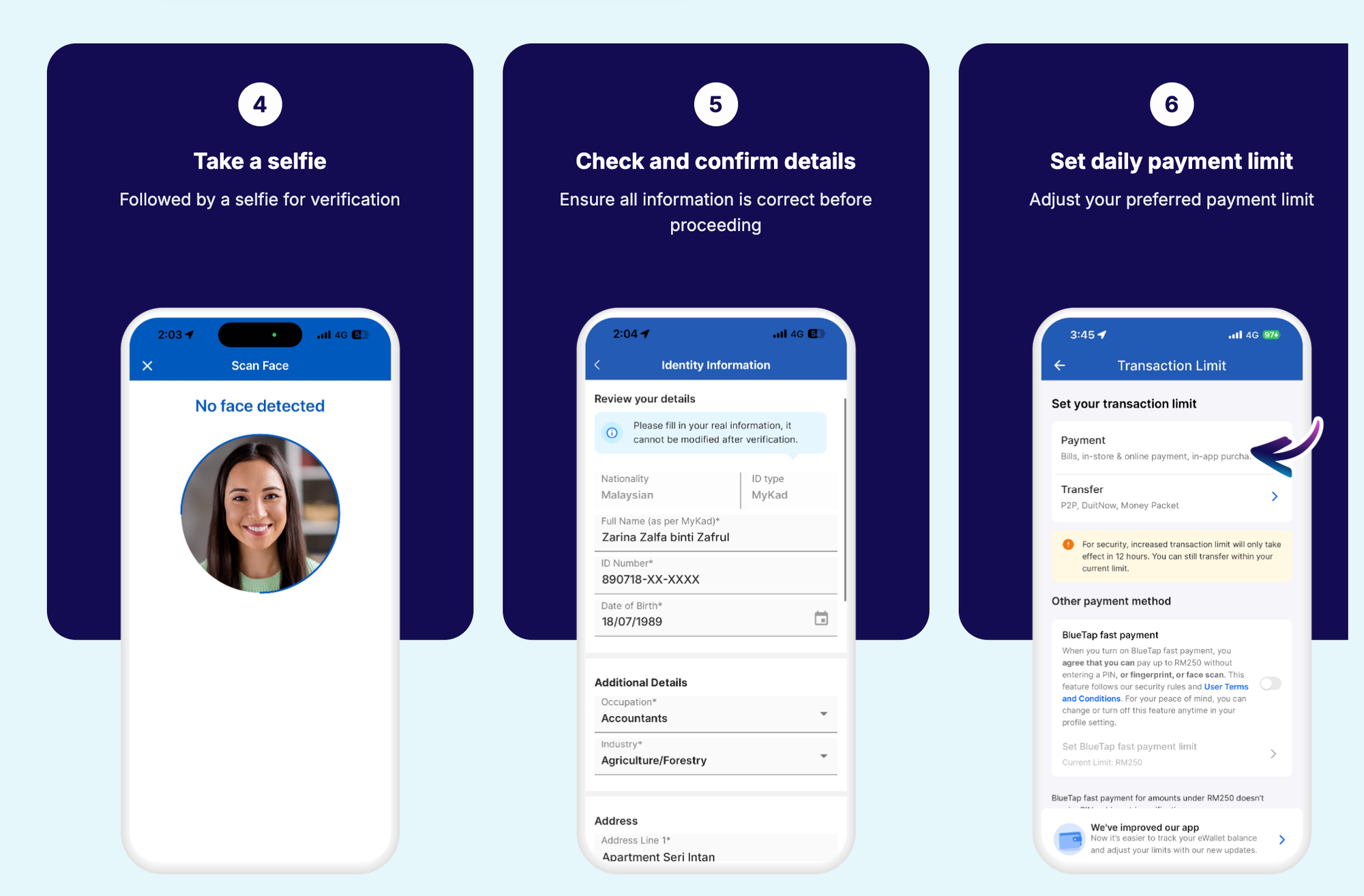
Setting up the eWallet as a foreigner takes about ten minutes:
- Download the TNG eWallet app and sign up with your mobile number.
- Enter the OTP sent by WhatsApp or SMS.
- Create a 6-digit PIN and set a security question.
- Fill in your personal details, then tap to verify your account.
- Select your nationality, photograph your passport, then take a selfie.
- Check that the details pulled from your passport are correct and submit.
- Once verified, load your card via bank transfer.
A few things to know:
- Your account starts on a "Lite" tier with a low limit (RM200 at the time of writing). Complete the passport verification to unlock the higher "Premium" limit, and do it on day one so you're not stuck mid-grocery shop.
- Verification isn't always instant. It can take up to 48 hours, so don't leave it until the morning you need to pay for something.
- Take your passport photo in good light with no glare or shadows, or you'll have to redo it. Make sure your passport has plenty of validity left, too.
- Topping up with a foreign card can carry a fee. Check the fee in the app before you load a big amount.
If you're coming from Singapore, PayNow will not work; however, international credit cards are readily accepted for the short term.
6. Find your grocery store (and your drinking water)
Scout your nearest supermarket, a quick fix, and the online options. I prefer Jaya Grocer in Eco Galleria and Ben’s Independent Grocer in Medini Mall. Village Grocer is also popular with expats for imported food, and it has a new location at Horizon Square Mall (Horizon Hills).
(Be sure to stop by the in-store bakery, The Baker's Son, at Jaya and treat yourself to their delicious "Soft Sourdough Bread," french croissants and other much-needed stress relievers!)

That said, grocery stores, 7-Elevens, and 99 Speedmarts are everywhere, and water is readily available, including at Mr. DIY. Tap water is not recommended to drink. Many homes and buildings have filtration systems, but if you don’t, vendors can provide one on contract.
The Tasks That Need Paperwork (Days 3-7)
7. Banking (and a bridge account called Wise)
Come prepared with your passport, your pass or visa, proof of address, and sometimes a tenancy or employer letter. Requirements and speed vary a lot by bank and even by branch—my honest advice: start early and expect a second visit.
In the meantime, you need something to bridge the gap, and that's where Wise comes in.
It's a multi-currency account and debit card that lets you hold and convert 40+ currencies. It's free to open, with no monthly fee or minimum balance. You load it from your home account, convert at the mid-market rate, and spend in ringgit. If you're still being paid in AUD, GBP, EUR or USD, it also gives you local account details so you can get paid without a bank account here.
How to set it up:
- Download the Wise app (or use the website) and create a personal account.
- Verify your identity. Foreigners in Malaysia will need a passport, proof of address and their visa or pass.
- Add money in ringgit or another supported currency.
- Order the debit card once you're verified. There's a one-time fee. [Check the current amount.]
- Link it to your Touch 'n Go eWallet or use the QR code (scan and pay functions) for everyday spending while you wait on your bank.
Two things to know: First, your Wise account isn't a bank account. The account has a holding limit of RM20,000 (or the equivalent), and you can only spend what you've loaded.
Second, a Malaysian Wise account requires you to upload a tenancy agreement, so if you're still overseas, open it in your home country before you land and load some funds. It's the easiest thing you can tick off before you move.
Click here to learn more about Wise.
8. Utilities and household setup
Find out details regarding electricity, water, gas, deposits, and whose name is on what. Ask your landlord in advance so you’re not left without an essential, like AC!!!
9. Transport
Most people drive in Johor Bahru, but it’s common to rent a car or rely on Grab for your first few weeks.
Do not buy a car in week one.
You'll make a better decision once you know your routines, your neighbourhood, and how you actually feel about JB traffic (I don't drive because the roundabouts are a free-for-all; I need four-way stops, traffic lights, and lane markings that mean something).
Before moving, check whether your foreign licence plus an International Driving Permit works for you, or whether you need to convert, and sort out your insurance. You may need to take an online course to get your licence.
10. Healthcare basics
Locate your nearest clinic, hospital and 24-hour pharmacy before you need them, and save the emergency numbers in your phone on day one. Gleneagles Hospital, located in Iskandar Puteri, is a renowned hospital for emergency and resident doctors.
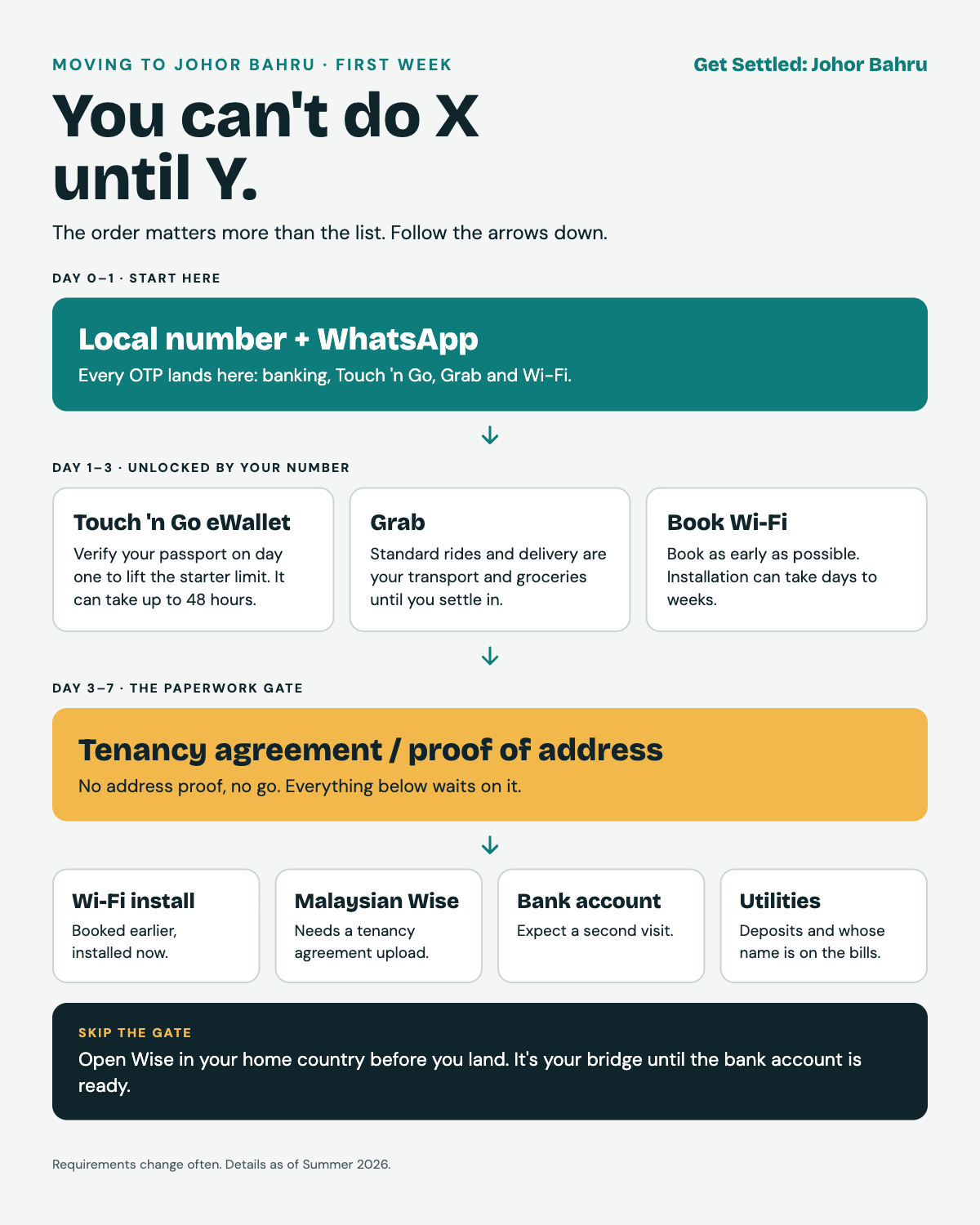
The "You Can't Do X Until Y" Cheat Sheet
- Local number + WhatsApp → before banking, Touch 'n Go, Grab and Wi-Fi OTPs
- Touch 'n Go passport verification → before you can use it beyond the starter limit.
- Tenancy agreement or proof of address → before Wi-Fi installation, a Malaysian Wise account, a bank account and utilities
- Wise (opened before you land) → your bridge until the bank account is ready
- Bank account → before easy bill autopay and some utility deposits
- Wi-Fi booking → as early as humanly possible, because of the install lag.
What I Wish Were True
That Wi-Fi installation was instant. That setting up everyday life essentials was more straightforward, with one clear answer. That realtors and rental listings were transparent (Click here to read about our nightmare move.)
Bonus: If You're Moving With Kids
Everything above is just the logistics layer. If you have school-age children, start looking at international school options and admission timelines now, since waitlists and intake dates are not forgiving. This could be its own post, so tell me if you'd like it.
The Skinny
The first weeks in a new city are chaotic, but it gets easier once the foundations are in place. If you're reading this thinking, "I'm not ready for any of this," I promise you the overwhelm will subside, and you can get on to the fun stuff of decorating and setting up your new home.
Have a question about moving to JB? Click here to send me an email.